


.png)
.png)


1. Log in to your Plesk account.
2. Click on Mail from the Sidebar Menu.

3. From the email list, click on the email account you want to rename.

4. Enter the new email name in the email address field.
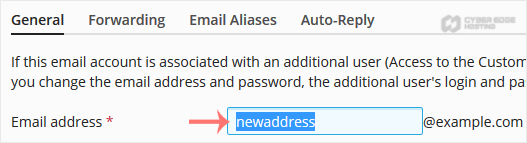
5. Scroll down and click OK.
Your next idea starts with a name.
Find a domain for your website, or bring an existing name to Cyber Edge Hosting.
Explore domainsA home for what you’re building.
From your first website to an online store, our team can help you find a place to start.
Talk to our teamIndependent hosting.
Real people.
A team behind your next step. Get to know Cyber Edge Hosting.
Our storyMore time for your website.
Explore Managed WordPress Care, with help for the work behind your WordPress site.
Talk to our teamA safer home for your site.
Have questions about protecting your website? Our team can help you explore your options.
Talk to our team
1. Log in to your Plesk account.
2. Click on Mail from the Sidebar Menu.
3. From the email list, click on the email account you want to rename.
4. Enter the new email name in the email address field.
5. Scroll down and click OK.
Follow this tutorial to create an email account in Plesk. 1. Log in to your Plesk account....
You can access your Email directly from Webmail. Open https://webmail.example.com, and...
You can change your email password in Plesk through the following steps: 1. Log in to your...
